Profiler Configuration Tool

Software Version Selection

Profiler Base Code Version: Select the version of Profiler Base Code that is being used

Hardware Selection

Profiler Hardware: Select the profiler hardware being used

Winch Hardware: Select the winch hardware being used

Sonde Options

Number of Sonde Parameters being returned: How many values will be returned by the EXO Sonde?

Sonde Parameter used for Depth: Which EXO parameter code is to be used for Sonde Depth?

Stabilization Time (seconds): How long to wait, when the Sonde reaches the measurement position, before the measurement begins?

Measurement Time (seconds): How long the Sonde takes to make its measurement accurately? This will depend on averaging times etc set in the Sonde.

Convert Sonde EC units from uS to mS? Check this box if an EC unit conversion (divide by 1000) is to be made in the data logger.

Reference and Logging Options

Depth Measurement Reference: Choose the Reference for the Depth Measurement:
Surface of Water Column
OR
Bottom of Water Column.

Check this box if AHD corrected values are to be logged for all depth data.

Profiling Options

Profile Direction: Which direction will the Sonde travel during the first half of the profile operation?

How often to profile (minutes): How often will profiles be performed?

Offset for Profile (minutes): When, during the profile interval, will the profiles be performed?

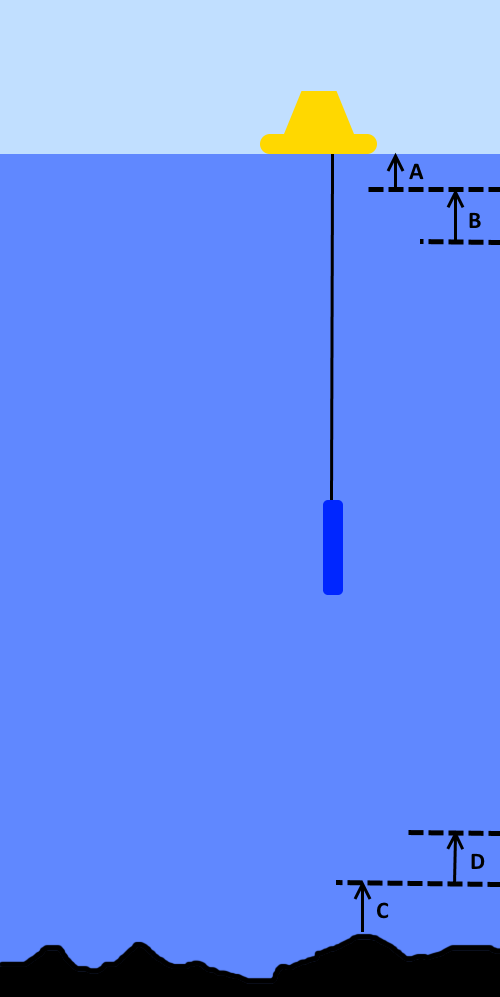
Surface Safety Distance (metres): Label A on the diagram.

The system will abort and return to Setup mode if the Sonde enters this area during its operation.

Surface Profile Limit (metres): Label B on the diagram.

The distance (A + B) is the shallowest allowed profiling position for the Sonde.

Bottom Safety Distance (metres): Label C on the diagram.

The system will abort and return to Setup mode if the Sonde enters this area during its operation.

Bottom Profile Limit (metres): Label D on the diagram.

The distance (C + D) is the deepest allowed profiling position for the Sonde.

Minimum Battery Voltage below which no Profiling will occur (Volts): Minimum Battery Voltage that will support profiling operations.

Profiling Method

Profile steps will be computed using a fixed step size between specified Start and End depths.

Suitable Profile steps for the water column will be selected prior to each profile from a user-defined list.

Continuous measurements will occur while Sonde is moved between the specified Start and End depths.

Park Options

Sonde Park Depth (metres): The depth where the Sonde will be parked between profiles.

Note: this is measured with respect to the Depth Reference that has been selected.

How often to perform a Park Check (minutes): How often will a Park position check be performed?

This check ensures that the Sonde is at its Park position.

Offset for Park Check (minutes): When, during the Park Check interval, will the process take place?

Hourly Measurement Options (at Park Position)

Offset for Hourly Measurement (minutes): At what point in the hour, will the Sonde measurement occur?

Check this box if the Sonde is to be wiped as part of the hourly measurement.

Water Column Options

Water Column Measurement Option Selection


Check this box if a Depthsounder sensor is to be used as the instrument for measuring the Water Column.


Check this box if a Radar sensor is to be used as the instrument for measuring the Water Column.


Check this box if an Altimeter sensor is to be used as the instrument for measuring the Water Column.


Check this box if an Analog Output Transducer is to be used as the instrument for measuring the Water Column.


Check this box if a 6-Series Sonde is to be used as the instrument for measuring the Water Column.


Check this box if an ECHO Sounder (on EXO Aux port) is to be used as the instrument for measuring the Water Column This option is only valid on CR1000X systems running 2.04 or higher and CR1000 systems running 1.89 of higher.


Check this box if there is no instrument to measure the Water Column and a fixed depth will be entered.

Check this box if the fallback process for Water Column measurement is to be used in situations where the Water Column can not be established accurately.

Maximum Sensible Value for Water Column measurement: This value is a limit check for the Water Column measurement.

What is the largest value that is possible at this location?

Minimum Sensible Value for Water Column measurement: This value is a limit check for the Water Column measurement.

What is the smallest value that is possible at this location?

Offset for Hourly Water Column measurement (minutes): The Water Column is measured hourly.

At what point in the hour will this measurement take place?

Maximum Sonde Depth (metres): What is the deepest position that the Sonde is able/allowed to go?

Maximum Cable Length (metres): What is the length of the cable on the reel?

Additional Sensors and Data Storage

Is there a user defined code block to include in the profiler code?

Does this system have MET sensors installed? For Code versions 1.87 and earlier for CR1000 and 2.01 and earlier for CR1000X, the MET sensor will be a Vaisala WXT-5xx. All other versions will be Gill Maximet unit which may include an onboard compass and/or GPS. Version 1.91 and beyond for CR1000 will have the option to select either the Vaisala WXT or the Gill Maximet

Does this system have a standalone GPS sensor installed? Do not check this box if a Gill Maximet is being used with GPS on board.

Is there a need to store data in the format to suit ViPer software?

Communications Options

Modem Power Options

Is there a modem on the system whose power is controlled by SW12V?

Modbus Slave Communications

Is this system interfaced to another device using Modbus?

FTP Data Delivery (Ethernet)

Is this system pushing data files to a server using FTP?

Is this system calling back to eagle.io?

diagram